

Hardware
Hardware for TargaScore
TargaScore works in two ways: on a Raspberry Pi with the TargaScore image, or as an Android TV app on a media box such as the Formuler Z10 SE. Both show the same scoreboard.
Unsure which to choose?
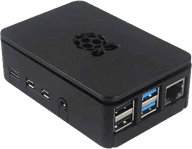
Raspberry Pi
A fixed setup next to the table: you write the TargaScore image to an SD card and connect the Raspberry Pi to the television.
- Raspberry Pi model: [Recommended model to be added] To be supplied
- SD card: [Minimum size and speed class to be added] To be supplied
- Power supply: [Recommended power supply to be added] To be supplied
- HDMI cable: An HDMI cable matching the connector on the Pi model and on the television
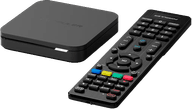
Android TV
TargaScore as an app on an Android TV device, for example the Formuler Z10 SE. You install the app from the Google Play Store.
- Recommended device: Formuler Z10 SE
- Android TV with Google Play: The device needs access to the Google Play Store
- Google account: Required to install apps from the Play Store
- Network connection: Network cable or Wi-Fi
Raspberry Pi or Android TV?
Both options show the same scoreboard. The difference is in the installation, the maintenance and how much you want to be able to configure yourself. The comparison below is meant to help you choose; if you are unsure, get in touch.
Raspberry Pi
- Ease of installation
- You write an image to an SD card yourself and connect the device.
- Technical knowledge required
- Some confidence with computers helps; the step-by-step guide walks you through it.
- Flexibility
- A fixed, predictable setup dedicated to TargaScore.
- Maintenance
- An occasional new image or update, following the manual.
- Updates
- New image versions are published on the hardware page.
- Recovery after a power cut
- The device is set up to return to the scoreboard after starting up.
- Recommended use
- A fixed setup at a table, where the device does not need to do anything else.
Android TV (Formuler Z10 SE)
- Ease of installation
- You install the app from the Google Play Store, like any other app.
- Technical knowledge required
- Limited; anyone who can install an app will usually manage.
- Flexibility
- The device can also be used for other purposes.
- Maintenance
- Updates run through the Google Play Store.
- Updates
- Through the Play Store, depending on the device settings.
- Recovery after a power cut
- Opening the app automatically after startup has to be configured and checked per device.
- Recommended use
- Venues that prefer to work with a ready-made media box.
The points listed are descriptive and not a guarantee. Settings and behaviour may differ per device, Android version and firmware version.
Need help choosing or installing?
Get in touch; we are happy to look at the situation in your room.